
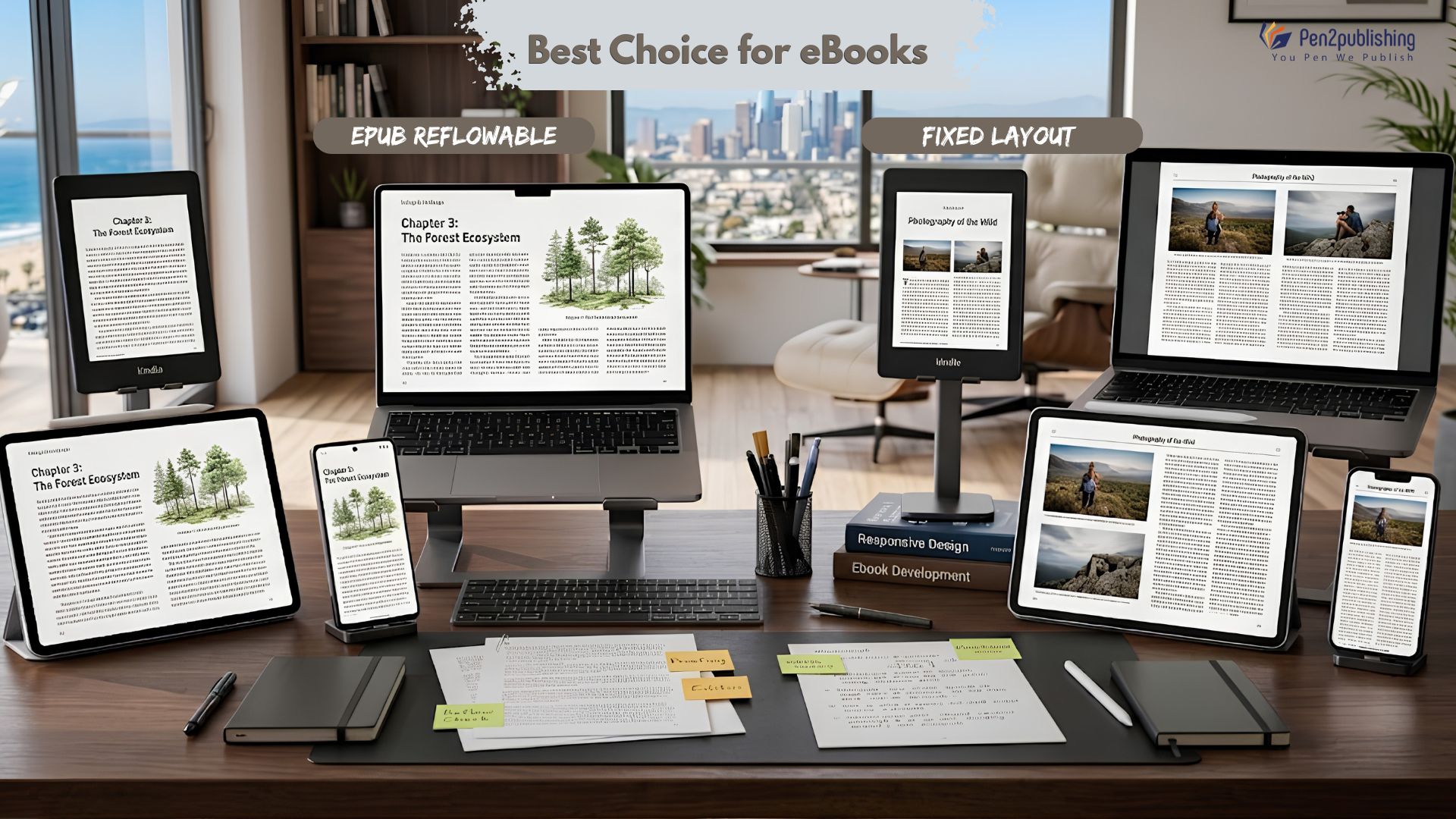
Choosing the wrong EPUB layout can quietly sabotage a book before a single review comes in. A novel that won’t let readers resize text, or a picture book whose illustrations shatter into the wrong place on a phone screen, doesn’t just look unpolished it actively pushes readers away.Layout is a bigger part of reader experience than most authors expect. It affects how comfortable a book is to read for hours at a stretch, whether it works for readers with visual impairments, how fast it loads, and whether retailers will even accept the file. Get it wrong, and even great writing can underperform.At a high level, there are two ways to build an EPUB: reflowable, where content adapts to the reader’s screen and preferences, and fixed-layout, where every element stays exactly where the designer put it.
Neither is “better” in the abstract. The right choice depends entirely on what kind of book you’re publishing.What Is a Reflowable EPUB?A reflowable EPUB is built more like a webpage than a printed page. Reflowable EPUB doesn’t fix text and images in a static position. The content flows dynamically, depending on the reader’s device, screen size, and personal settings. This is why reflowable EPUB is the default, industry-standard format for the vast majority of digital books, novels, memoirs, and non-fiction all depend on it.
How Reflowable EPUB Works
Content automatically adapts to different screen sizes, from a small phone to a large tablet, without the author needing to design multiple versions.Readers can change font size, line spacing, margins, and even switch themes (like night mode), tailoring the reading experience to their own comfort.
Benefits of Reflowable EPUB
- Excellent readability – text reflows to fit whatever screen it’s displayed on, so nothing gets cut off or shrunk illegibly.
- Mobile-friendly – works cleanly across phones, tablets, and e-readers of every size.
- Better accessibility – plays well with screen readers and text-to-speech tools, and lets readers with low vision enlarge text.
- Smaller file size – since layout is generated on the fly rather than baked into fixed pages, files stay lean and load quickly.
- Most eBook platforms support – the default format most sellers anticipate and test for.
What Is a Fixed Layout EPUB ?
A static layout EPUB works the other way: it locks the page design in place, so what the designer designed is exactly what the reader sees, regardless of the device. EPUB’s structure, but with precise placement of elements, photos and graphics, like a PDF.
How Fixed Layout Works
The page remains visually identical across devices – no reflow, no resizing based on screen width.The text and images are locked down in place, keeping the exact relationship between elements that the designer intended.
Benefits of Fixed-Layout EPUB
Keeps complicated designs – pages with overlapping text, bespoke font, or detailed page graphics remain intact.
Great for image-heavy books – graphics and images are exactly where you want them, with no surprise repositioning.
Better control over visual presentation – authors and designers keep full authority over how every page looks, which matters when design is part of the storytelling.
Reflowable vs Fixed Layout
Here’s how the two formats stack up when you compare them directly, from an author’s perspective.
Reading Experience
Reflowable EPUB gives readers a flexible, personalized experience where they can adjust the book to fit their eyes and their device. Fixed-layout EPUB gives a consistent, designer-controlled display, but that consistency comes at the cost of reader flexibility.
Design Flexibility
Reflowable formats are best suited to simple, text-driven layouts. Fixed layout is built for complex page designs where the positioning of images, callouts, or captions is essential to how the content reads.
Device Compatibility
Reflowable EPUBs enjoy near-universal support across e-readers, apps, and tablets. Fixed-layout EPUBs have more selective support, and can behave inconsistently on smaller screens or older devices; some fixed-layout books aren’t practical to read on a basic e-ink Kindle at all.
Accessibility
Reflowable EPUB is far more compatible with screen readers, works naturally with adjustable font sizes, and generally respects a reader’s personal display preferences. Fixed layout struggles here: text-to-speech and font adjustment are limited or unavailable unless the file is specifically built with accessibility features like text pop-ups.
File Size and Performance

Reflowable files tend to load faster and take up less storage, since the format doesn’t need to embed exact visual positioning for every page. Fixed-layout files, especially image-heavy ones, are larger and can be slower to load a real consideration for readers on limited data plans or older devices.Which Books Need Reflowable EPUB? Reflowable is the right call whenever the words matter more than the exact page design which is most books.
Fiction Books
Novels are built for immersive, linear reading, and readers expect to control font size and layout to their liking.
Memoirs
Text-driven storytelling benefits from the same flexibility as fiction, with no need for fixed visual design.
Business Books
Clear, adjustable text supports the kind of practical, often skimmed reading business audiences do.
Self-Help Books
Readers frequently want larger fonts or high-contrast themes for comfortable, extended reading reflow.
Most Non-Fiction Books
Outside of heavily illustrated categories, non-fiction is almost always better served by reflowable adaptability and accessibility.Which Books Need Fixed-Layout EPUB?Fixed layout earns its place when a book’s design is inseparable from its content.
Children’s Books
Picture books depend on precise text-to-illustration placement that reflow would break.
Comic Books
Panel layout and reading order are core to how comics work, and can’t survive being reflowed.
Cookbooks
Recipes often pair images with tightly formatted ingredient lists and steps that need to stay aligned.
Art & Photography Books
Visual presentation is the entire point; reflow would undermine the book’s purpose.
Educational Books with Graphics
Diagrams, charts, and labeled illustrations often need to stay locked to their surrounding text to make sense.
Platform Compatibility
Support for each format varies by retailer, and the details matter for how you prepare your files.
Amazon Kindle Direct Publishing (KDP)
KDP accepts both reflowable and fixed-layout EPUBs, but a single book can’t mix the two; the whole file has to be one or the other. Fixed-layout titles on KDP don’t allow readers to change font size, which limits their usability on smaller Kindle devices, and some fixed-layout formats (like those with text pop-ups) have their own specific technical requirements. As of March 2025, KDP requires EPUB rather than the older MOBI format for new and updated eBook submissions.
Apple Books
Apple Books supports both reflowable and fixed-layout EPUB, but fixed-layout files come with a distribution catch: they generally can’t be pushed through aggregators like Draft2Digital or Streetly, and instead need to be uploaded directly through Apple’s own publishing tools.
Google Play Books
Google Play Books accepts both formats as well, making it one of the more flexible platforms for authors who want to publish visually complex or illustrated titles alongside standard text-based ones.
Kobo
Kobo also supports reflowable and fixed-layout EPUBs, though as with other platforms, testing on Kobo’s own preview tools before publishing is the safest way to catch layout issues specific to their reading apps and devices.
Common Mistakes Authors Make
Choosing Fixed Layout for Text Books
Locking a text-heavy novel or non-fiction book into a fixed layout strips away the accessibility and readability features readers expect, often for no real design benefit.
Ignoring Device Testing
A layout that looks perfect on a laptop screen can break on a phone or e-reader. Skipping cross-device testing is one of the most common and most avoidable causes of formatting complaints.
Uploading Unoptimized Images
Oversized or poorly compressed images bloat file size, slow load times, and can cause rejections or poor previews on some platforms.
Not Following Platform Guidelines
Each retailer has its own technical requirements. Ignoring them leads to failed validations, rejected uploads, or eBooks that display incorrectly once live.
Latest EPUB Trends (2025–2026)
Mobile-First Reading
More readers than ever are reading primarily on phones, pushing publishers to prioritize layouts that perform well on small screens by default.
Accessibility-First Publishing
Accessibility is increasingly treated as a baseline requirement rather than an afterthought, with more authors and publishers building EPUBs that work well with screen readers and assistive technology from the start.
EPUB3 Adoption
EPUB3 continues to become the practical standard across platforms, offering better support for accessibility features, multimedia, and more sophisticated fixed-layout design than earlier versions allowed.
AI-Assisted Formatting
AI-assisted tools are increasingly used to speed up EPUB formatting, catch validation errors, and help convert manuscripts between reflowable and fixed-layout formats though human review remains essential for anything design-heavy.
How Pen2Publishing Helps
Formatting an EPUB correctly takes more than exporting a Word document. It requires understanding how each platform interprets code, how different devices render layout, and how to preserve design intent without breaking accessibility or performance.
Professional EPUB Formatting
Every file is built to spec, with clean code that validates properly and displays consistently.
Fixed & Reflowable Conversion
Whether a manuscript needs to move from reflowable to fixed layout or the reverse the conversion is handled without losing design fidelity or reader functionality.
Platform-Ready Files
Files are prepared to meet the specific requirements of KDP, Apple Books, Google Play Books, and Kobo, reducing the risk of rejections or display issues after launch.
Quality Testing Across Devices
Every eBook is checked across multiple devices and reading apps before delivery, catching layout problems before readers do. If you want your book to look right everywhere it’s read, professional formatting takes the guesswork out of the process so you can focus on writing, not troubleshooting code.
Tips for Choosing the Right EPUB
Know Your Audience
Consider how and where your readers are likely to read a business audience skimming on a phone has different needs than a design-conscious reader flipping through an art book.
Match the Format to Your Content
Let the content lead the decision: text-driven books lean reflowable, visually complex books lean fixed-layout.
Test Before Publishing
Preview your EPUB across multiple devices and apps before it goes live, since issues that don’t show up on one screen often appear on another.
Think About Future Distribution
Consider where else the book might be sold or adapted down the line a format decision made early can save a costly rebuild later. Reflowable and fixed-layout EPUBs solve different problems. Reflowable vs. fixed-layout EPUBs tackle distinct difficulties. Reflowable is adaptable, accessible and highly compatible, which is what most text-based books want. Fixed-layout is more accurate visually, so it’s a better choice for children’s books, comics, cookbooks, and other richly illustrated items. It doesn’t matter which format is better; the right choice depends on how well it fits the material and the reader. If authors put reader experience and platform compatibility first from the start, they won’t have to pay a lot of money to reformat and deal with angry reviews later on.
FAQs
1. What’s the difference between reflowable and fixed-layout EPUB?
Reflowable EPUB adapts the content to the reader’s screen and preferences, fixed-layout EPUB places each component in a permanent area that is the same on every device.
2.What is the optimal format for novels in EPUB?
Reflowable EPUB because it puts the reader first, and makes the book accessible and easy to read, which is what novel readers expect.
3. Fixed-layout EPUB: When to use?
Like children’s picture books, comics, cookbooks, art and photography books, where the design of the book is part of how it is read.
4. Does Amazon KDP support fixed-layout EPUB?
Yes. KDP accepts fixed-layout EPUBs, though the entire book must be fixed-layout throughout, font resizing isn’t available to readers, and some fixed-layout formats have additional technical requirements.
5. Is it possible to convert a reflowable EPUB to a fixed-layout EPUB?
Yes but usually that means redesigning the file rather than simply exporting it, because fixed layout depends on exact positioning which reflowable files don’t contain by default.